Where are the Arena Mates?
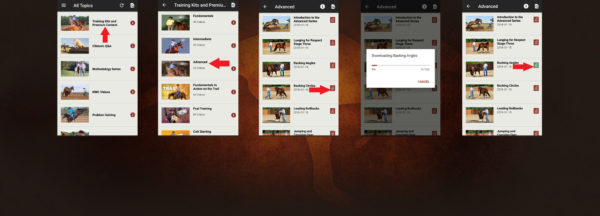
You became a premium No Worries Club member or purchased a digital training kit and immediately logged on to the Downunder Horsemanship app to access your training content to begin studying the Method. But wait … where are the Arena Mates? Here’s how to find them on your mobile device.
Step #1:

From your mobile device, log in to the Downunder Horsemanship app and click on the Training Kits and Premium Content category.
Step #2:

From the Training Kits and Premium Content category, select the training kit you want to study. In this example, we’re choosing the Advanced Kit.
Step #3:

When you open a training kit, you’ll see a list of all of the lessons included in the kit. To select the lesson’s Arena Mate, click on the red book icon on the right side of the screen. In this example, we’re selecting the Arena Mate for the Advanced lesson Backing Angles.
Step #4:

When you click on the Arena Mate, your device will automatically start to download it. When it’s finished downloading, the training manual will open up.
Step #5:

When you open a lesson, you’ll know if you’ve already downloaded the Arena Mate because the book icon will be green.
Curious about going mobile with the Method? Learn more about the Downunder Horsemanship app and our digital training kits on our website.
